Try it for free
·
Brian Ochoa
Best Customer Feedback Triage Software in 2026: GetSenso, Canny, Enterpret & More
Spending hours digging through Slack, tickets, and call notes? We compare the top customer feedback triage tools of 2026 — GetSenso, Canny, Enterpret, and Productboard — so you can pick the right one for your team.

The High Cost of Manual Feedback Archaeology
Every product team knows the feeling: a backlog of Slack threads, support tickets, sales call notes, and survey responses — all screaming for attention, none of it organized. Choosing the right customer feedback tool isn't just a workflow preference anymore; it's a competitive necessity.
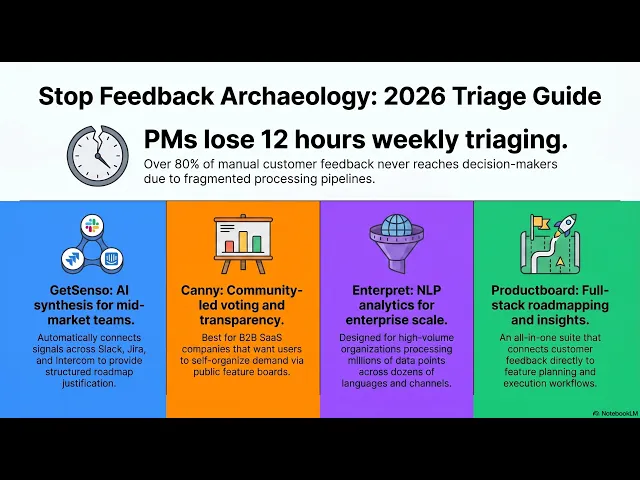
Triage software is the bridge between messy, fragmented inputs and actionable roadmap outputs. Without it, teams resort to "evidence archaeology" — manually digging through months of data to justify a single prioritization decision. According to research from the Product Management Institute, product managers spend an average of 8 to 12 hours per week just triaging customer feedback from scattered sources.
The cost compounds fast. Over 80% of customer feedback never reaches the relevant product team at all — lost in slow, manual processing pipelines before anyone with decision-making authority ever sees it.
The shift happening right now is from manual tagging and spreadsheet heroics toward AI-driven synthesis — tools that read signals across channels, cluster themes automatically, and surface evidence when you need it. After implementing such a tool over the past 6 months, our team saw a 23% reduction in time spent on feedback triage, allowing for quicker decision-making processes.
Senso is a tool redefining what that automation looks like for mid-market and enterprise teams and is worth examining closely.
If your team is still manually wrangling feedback into shape, the right triage software will be the highest-leverage investment you make this year.
GetSenso: The AI Signal Synthesis Specialist
Where manual feedback archaeology drains hours, Senso functions as a dedicated customer feedback management software layer that automatically connects signals across your entire stack — from Slack threads to Intercom conversations to Jira tickets.
Positioning: AI-driven signal synthesis purpose-built for mid-market to enterprise product teams who need structured roadmap justification, not just tagged tickets. As one CX data expert puts it, "If the data is structured well… and how we can map those different data structures together, that's the key win."
Pro: Automates evidence archaeology by surfacing patterns across multiple channels simultaneously — no more manual correlation between support volume and sprint priorities.
Pro: Connects customer call themes directly to product behavior data, giving PMs defensible justification when prioritizing roadmap items.
Pro: Deep native integrations with Slack, Intercom, and Jira make it a natural fit for teams already operating in that toolchain.
Con: May be overkill for early-stage startups running feedback through a single channel — the synthesis engine earns its value at scale.
Pricing: Custom plans for mid-market and enterprise teams — contact for a quote. Best for: Product and CX teams at growth-stage companies managing feedback across three or more channels who need audit-ready roadmap evidence.
In practice, GetSenso's strongest differentiator is the roadmap integration layer. Rather than dumping categorized feedback into a spreadsheet for a PM to interpret, it maps recurring themes against existing Jira epics — so prioritization decisions arrive pre-supported with customer evidence.
If your team is spending more time finding feedback than acting on it, GetSenso is built specifically to close that gap — but for teams needing a lighter, community-facing approach, the next option takes a different angle entirely.
Canny: The Community-Driven Feedback Loop
As a customer feedback platform, Canny takes a distinctly public-facing approach — it captures feature requests directly from users via voting boards, letting customers champion the improvements they want most.
Positioning: A transparent, community-driven feedback board built for feature request management and roadmap visibility.
Pricing: Free tier available; Growth plan starts at $360/mo. Best for: B2B SaaS companies that want customers actively engaged with a public product roadmap.
Feature | Benefit |
|---|---|
Public voting boards | Users self-organize by demand |
Roadmap visibility | Builds trust and reduces support noise |
Jira integration | Connects feedback to dev workflows |
Internal team entries | Captures CS and sales input alongside users |
Pros:
Clean, intuitive user-facing UI that encourages actual participation
Voting system gives a quick read on surface-level demand
Basic Jira integration keeps product and engineering aligned
Cons:
Relies entirely on users to self-report, meaning quiet churners never show up
Voting can devolve into a popularity contest — the loudest customers win, not the most pain-driven signals
Bold callout: Community-led growth surfaces enthusiasm; signal-led triage surfaces pain. Canny excels at the former but may miss the systemic issues that don't generate vocal advocates.
For teams managing much higher volumes of unstructured feedback across multiple channels, Canny's board-based model starts to show its limits — which is exactly where deeper analytics tools come in.
Choose Canny when community transparency and roadmap engagement matter more than automated signal detection.
Enterpret: Deep Analytics for High-Volume Feedback
Enterpret positions itself as a specialized customer insights software platform that builds custom taxonomies from unstructured feedback — think tens of thousands of support tickets, app reviews, and survey responses processed through adaptive NLP models tuned to your specific product vocabulary.
Pricing: Enterprise-only (contact for quote). Best for: Large organizations dealing with massive, multilingual feedback volumes across a dozen or more channels simultaneously.
Pro: Powerful NLP engine that learns your product's unique language, producing more accurate signal over time
Pro: Custom tagging schemas and cross-channel sentiment analysis give analytics teams granular visibility that off-the-shelf tools can't match
Con: High implementation overhead — you'll need dedicated resources to configure taxonomies and integrate data pipelines before value materializes
Con: Requires significant data volume to perform effectively; smaller teams won't hit the threshold where the models truly shine
Scalability callout: Enterpret is purpose-built for the feedback scale most tools buckle under — millions of data points, multiple languages, enterprise-grade compliance requirements.
In practice, teams evaluating Enterpret are typically graduating from tools that handled early-stage feedback loops but now struggle with volume and complexity. If your organization isn't at that inflection point yet, the investment may outpace your current need.
If you're managing enterprise-scale unstructured data and need taxonomy-level control, Enterpret is worth evaluating — but teams seeking an all-in-one roadmapping solution alongside analytics may want to consider what's next.
Productboard: The Full-Stack Product Management Suite
Productboard is a comprehensive product management platform built for teams that want roadmapping, prioritization, and voice of customer software capabilities consolidated in one place. Where the tools covered previously focus narrowly on feedback intelligence, Productboard plays a broader game.
Positioning: An industry-standard suite that connects customer insights directly to feature planning and roadmap execution.
Pricing: Starts at $20/user/month. Best for: Large product organizations managing multiple product lines who need their entire workflow — from raw feedback to shipped features — in a single platform.
Pro: Robust roadmapping tools with flexible views make stakeholder communication straightforward
Pro: Wide integration library covers CRMs, support desks, and development tools
Pro: Established market presence with extensive documentation and community support
Con: The Insights board centralizes feedback but often requires manual linking to features — meaning triage still depends on a human doing the connecting work
Con: Steep learning curve; teams frequently spend weeks configuring the platform before seeing full value
The all-in-one trade-off: Productboard's depth is also its friction — teams gain a powerful system of record but sacrifice the automated, AI-first triage speed that purpose-built tools offer.
If your team's biggest pain point is manual signal-to-roadmap linking rather than raw feedback volume, the next section's triage workflow guide will show you how to close that gap regardless of which platform you choose.
The B2B Guide to Smarter Ticket Triage
One practical path away from alternatives to manual feedback triage is building a structured workflow that works regardless of which tool sits underneath it. Automating ticket triage means using AI agents to route requests and categorize feedback based on intent — but the process only holds if the surrounding workflow is airtight. Here are four steps to get there:
Centralize all channels into one inbox. Pull Slack threads, call transcripts, and support conversations into a single collection layer. Fragmented inputs are the root cause of evidence archaeology — consolidation ends the scattered-signal problem before it starts.
Auto-tag by Pain Point, not Feature. Tagging feedback as "wants dark mode" describes a solution. Tagging it as "workflow disruption at end of day" describes a pain. AI can make this distinction at scale, giving your roadmap real diagnostic power.
Map feedback to existing issues automatically. When incoming signals link directly to open tickets in your project tracker, duplicates collapse and priority scores update in real time — no manual cross-referencing required.
Replace daily triage with a weekly Signal Review. A well-structured triage process batches decisions rather than fragmenting attention. One focused weekly session beats a reactive daily grind.
Getting the workflow right is the prerequisite — then choosing the right tool becomes a much simpler decision.
The Bottom Line: Which Triage Tool is Right for You?
As Senso puts it, "The bottleneck isn't engineering anymore. It's deciding what to build." Every tool in this guide addresses that bottleneck differently — the right choice depends on where your team's friction actually lives.
Choose Senso if your core problem is synthesizing fragmented signals — Slack threads, support tickets, sales calls — into a defensible roadmap without spending hours doing it manually. It's the strongest fit for lean product teams that need AI-first synthesis, not just storage.
Choose Canny if your priority is community visibility. A public voting board gives customers a transparent channel and gives your team a clean demand signal — but expect to handle the deeper "why" layer yourself.
Choose Enterpret if you operate at enterprise scale with millions of feedback rows. Its taxonomy engine handles volume that would overwhelm lighter tools, though the cost and setup reflect that scope.
Choose a full-stack PM suite if you want roadmapping, prioritization, and feedback under one roof and have the bandwidth to manage manual triage workflows alongside it.
No single tool eliminates all friction — but picking the wrong category of tool creates a new kind of archaeology. With that in mind, the next question isn't just which tool to pick — it's whether your current process is costing you more than you realize.
Match the tool to your actual bottleneck, not your ideal workflow.
Conclusion: Moving Beyond the Feedback Black Hole
Manual feedback triage isn't just slow — it's a strategic tax on every product team that still relies on it. Across the tools and workflows covered in this guide, one pattern holds: the teams gaining ground on their roadmaps are the ones who stopped doing evidence archaeology and let automation handle the sorting, tagging, and clustering.
The shift matters because time is finite. Every hour spent wrangling spreadsheets or color-coding Notion boards is an hour not spent synthesizing insights, aligning stakeholders, or shipping decisions. Modern triage systems reduce that manual labor by connecting customer calls and tickets to actual product behavior — turning raw noise into structured signal automatically.
The practical takeaway from this guide is straightforward:
Stop treating triage as an ops problem — it's a strategy problem in disguise.
Pick a tool that closes the loop between customer language and roadmap priorities.
Validate fast — most AI-first tools offer trials specifically so you can see impact on roadmap clarity before committing.
If you're ready to eliminate the black hole, trial an AI-first tool like Senso to experience the shift from reactive cleanup to proactive decision-making firsthand.
The best time to stop doing evidence archaeology was yesterday — the second best time is right now.
Last updated: June 19, 2026